- Industry
- Real-time communications · connected devices
- Product
- Browser softphone + diagnostic instrument
- Users
- Frontend, SIP, QA and device engineers
- Stack
- React · Vite · SIP.js · WebRTC audio · Vitest
- Proof
- 5 sanitized screenshots · 11 unit tests · build pass
The problem
Calls connected, but audio was missing in one direction. The production app combined state management, UI chrome, optional noise processing, hold/resume and multiple media paths—any layer could mute playback. Endpoint registration, forked contacts, RTP loss and near-silent payloads produce the same user report: “I cannot hear them.”
Constraints
Delivery stayed inside the client's stack, tenancy, compliance and media-ownership boundaries. Where a choice was forced (suite vs owned plane, BYOC vs CPaaS, local vs cloud models), the architecture section below records the trade-off rather than a marketing rewrite.
Changing NAT, codecs or dialplan before classifying the failure adds risk without proof.
The solution
One call, one remote <audio> element, one evidence panel: register over WSS, place or answer a single session, mute mic/speaker, reject busy on a second INVITE, attach remote tracks with both Unified Plan event shapes, and stream ICE, RTP counters, jitter, packet loss and audio energy from the active RTCPeerConnection.
The lab deliberately excludes Redux, product UI frameworks, AudioWorklet noise graphs and multi-call queues so each layer must prove its own behaviour.
Architecture

flowchart LR
  Browser["React lab SIP.js getStats"] -->|"SIP WSS"| PBX["FusionPBX FreeSWITCH"]
  PBX --> Device["Embedded SIP device"]
  Browser <-->|"DTLS SRTP"| PBX
  PBX <-->|"RTP PCMU"| Device
  Browser --> Ev1["Browser evidence"]
  PBX --> Ev2["Channel logs"]
Softphone & live diagnostics
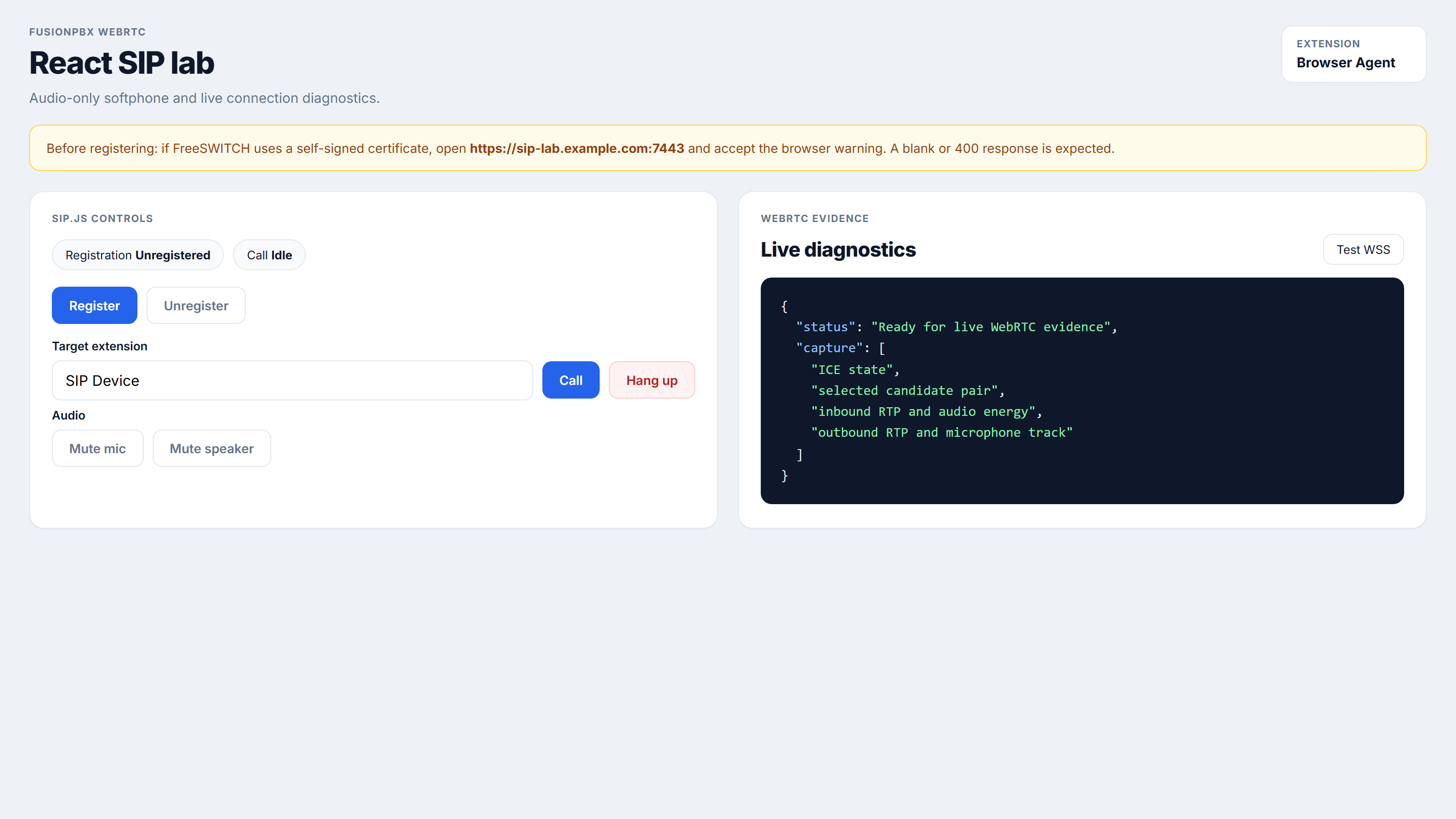
Controls cover registration, outbound dial, inbound answer/reject, mic and speaker mute, and a single active call policy. The panel surfaces ICE/connection state, selected candidate pair, sender/receiver tracks, inbound/outbound packets and bytes, jitter, loss, audioLevel, totalAudioEnergy, and the remote element’s srcObject / play state.
Implementation boundaries that mattered
- Remote track fallback — when
event.streams[0]is empty, build aMediaStreamfromevent.track; also hydrate fromgetReceivers()if the session establishes early. - Shared ICE options — identical STUN and 2s gather timeout on invite and answer paths.
- Plain playback — no noise-suppression worklet on remote audio in the lab (A/B against production).
Evidence & correlation
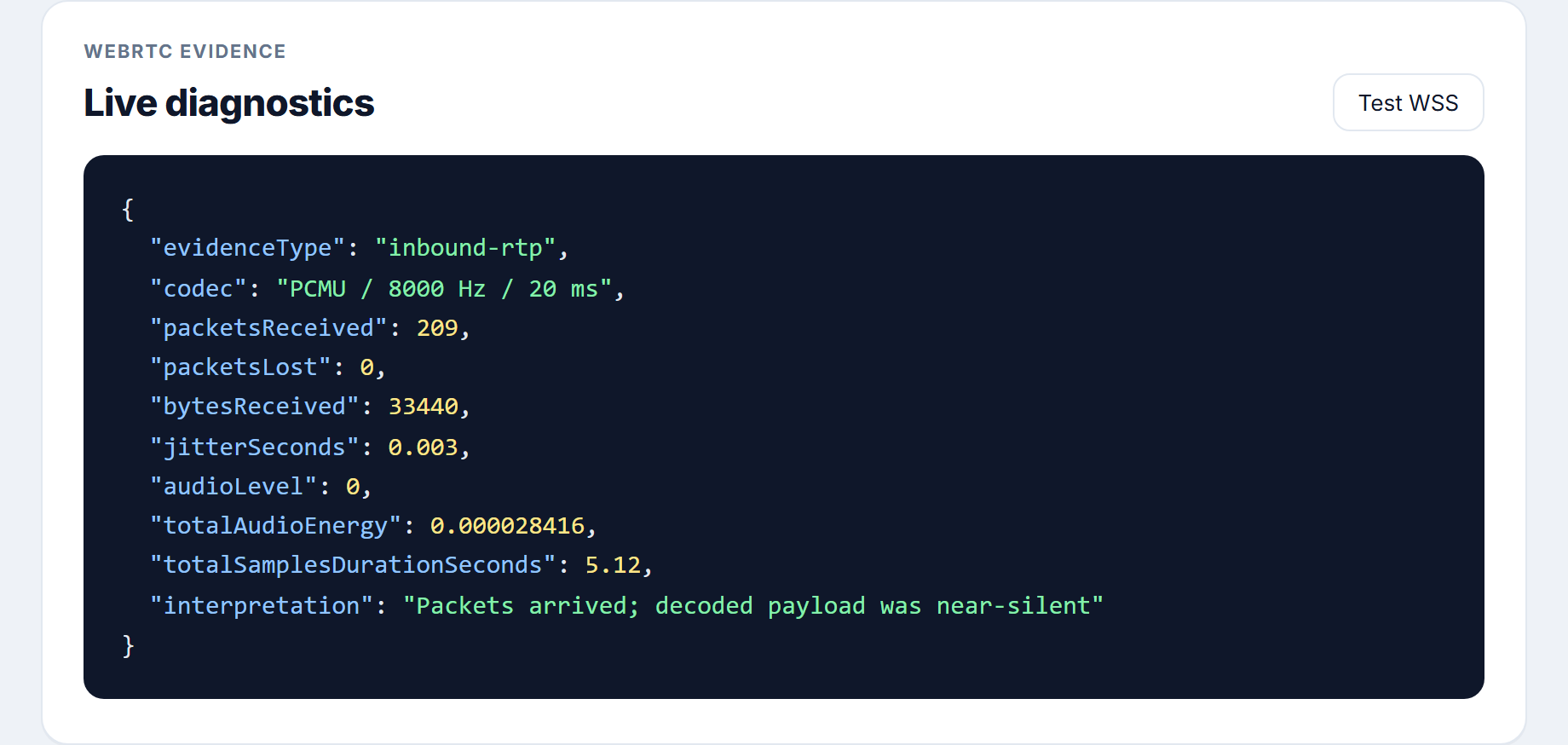
Sanitized capture: ~200 inbound PCMU packets in five seconds, zero loss, low jitter, 160-byte payloads—and near-zero decoded energy. That redirects ownership from browser attachment to far-end microphone, gain or firmware—not from “fix React.”


Server proof established boundaries: NORMAL_CLEARING after bridge does not prove audible browser playback; USER_NOT_REGISTERED is device availability; stale or forked contacts break controlled tests.
Diagnostic decision flow
flowchart TD
  Start["No remote audio reported"] --> Reg{"Destination registered?"}
  Reg -->|No| Offline["Registration issue"]
  Reg -->|Yes| Bridge{"Call bridged?"}
  Bridge -->|No| Sig["SIP or dialplan"]
  Bridge -->|Yes| Pkts{"Inbound RTP rising?"}
  Pkts -->|No| Ice["ICE DTLS RTP path"]
  Pkts -->|Yes| En{"Energy rises on shout test?"}
  En -->|No| Cap["Far-end capture payload"]
  En -->|Yes| Play{"Audio element playing?"}
  Play -->|No| Fe["Frontend attachment"]
  Play -->|Yes| Out["Speaker or OS output"]
Manual protocol: trust HTTPS/WSS certs → register browser → confirm single device contact → outbound call → 5s silence · 10s shout · 5s silence → compare packets and energy → repeat in production dashboard on the same network.
Outcomes
- Proved WSS digest registration and a known-good remote-track path.
- Separated silent RTP payloads from frontend playout defects.
- Gave frontend, PBX, QA and device teams a shared evidence vocabulary.
- Reduced pressure to change NAT/dialplan without packet proof.
- Automated tests: 11 passing (stream resolution, busy policy, shared media options).
Related architecture note: From broken WebRTC to a reusable SIP lab.
FAQ — buyer & architecture questions
Ten common questions about this case study, fit, and engagement.