- Industry
- Home services · clinics · inbound desks
- Type
- Multi-tenant AI receptionist SaaS
- Role
- Architecture + portal + telephony adapter
- Roles
- Platform admin · tenant owner · staff
- Stack
- Vue 3 · FastAPI · Asterisk ARI · JWT
- Proof
- Isolated workspaces · role-cut menus
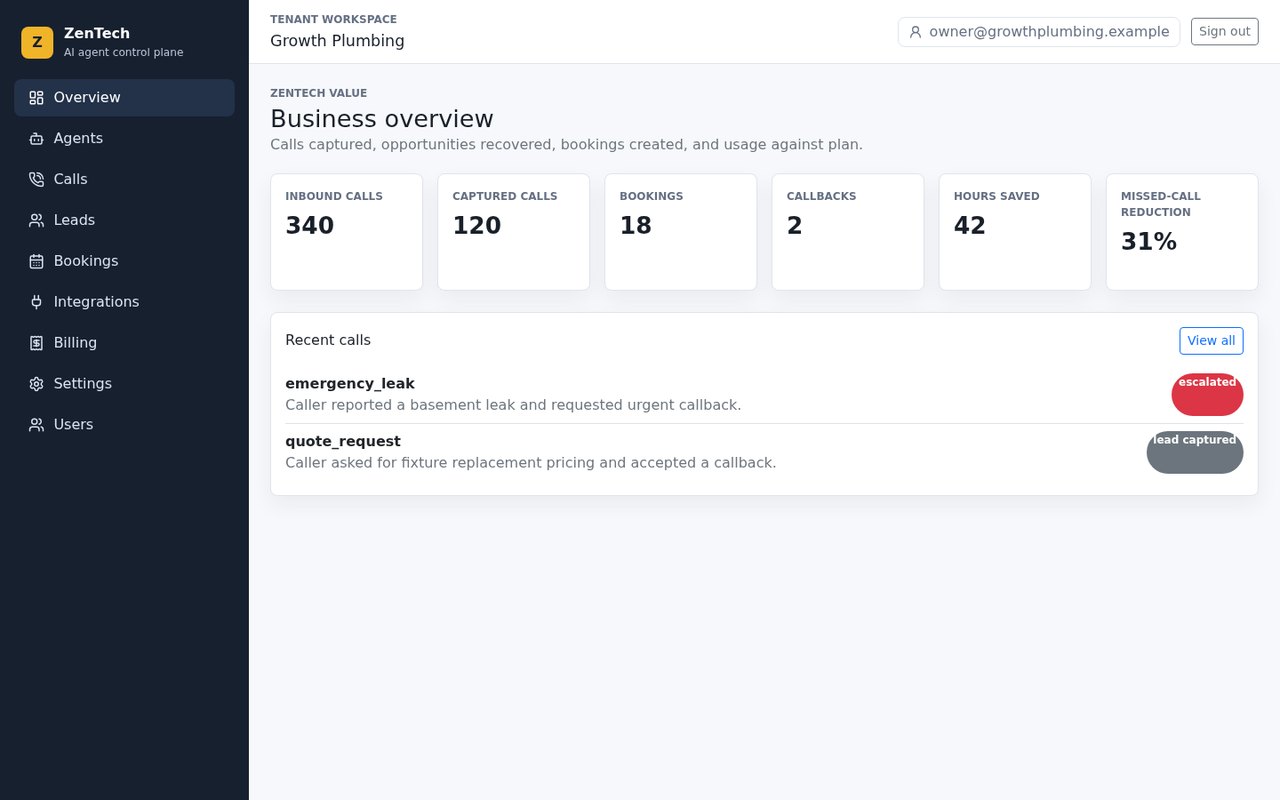
Owner home for the Growth Plumbing evaluation workspace. KPI tiles and a recent-call list (emergency leak escalated, quote request captured) are product chrome. The numbers are evaluation seed, not a published SLA.
The problem
Most small service businesses live on inbound calls: “Can you come today?”, “How much for a water heater?”, “I need a follow-up appointment.” The phone is the shop window. People cannot stand next to it all day.
Constraints
Delivery stayed inside the client's stack, tenancy, compliance and media-ownership boundaries. Where a choice was forced (suite vs owned plane, BYOC vs CPaaS, local vs cloud models), the architecture section below records the trade-off rather than a marketing rewrite.
What actually happens: the van is on a job, two calls arrive at once, lunch and after-hours go to voicemail, notes live on paper, the owner reconstructs the day at 10pm. The next plumber or clinic gets the work.
A hosted voice-widget demo does not fix that. The owner needs today’s calls, leads and bookings on a simple website, with staff who can work the list without holding the keys to billing.
Business requirements
Keep the shop window open without hiring a 24/7 receptionist. Answer overflow and after-hours, write down what the caller needed, book or escalate, and show it to the right person. Run many shops on one platform without mixing their data.
The solution
Multi-tenant AI receptionist is the signed-in product. The caller still dials the usual number. If staff cannot pick up, the voice agent greets, classifies the request, writes a short summary, and either books, captures a callback, or flags something urgent. The team opens a browser and works that list.
Three keys, one building:
- Platform admin — head-office operator. Sees every customer company, plans, usage and which tenant needs a call today. Not the plumber.
- Tenant owner — one company. Calls, leads, bookings, billing, settings and who is on the team.
- Tenant staff — the same daily queue. No Users menu. No platform screens.
This page is not Asterisk voice AI. Asterisk voice AI is the Asterisk ExternalMedia RTP turn engine. ZenTech is the SaaS portal and tenant OS that sits in front of that kind of agent — and in front of a PBX you already run.
How the system flows
When a call is missed, Asterisk ARI hands context to FastAPI; the AI receptionist captures intent and the owner sees it in the Vue portal.
flowchart TD
  Ring[Inbound call Asterisk] --> Miss{Answered?}
  Miss -->|No| ARI[ARI event to FastAPI]
  ARI --> AI[AI receptionist mock or live]
  AI --> Job[Lead or appointment record]
  Job --> Owner[Owner Vue dashboard]
  Job --> Staff[Staff callback list]
Architecture
Face, API, adapters. Isolation is an auth and row rule, not a shared spreadsheet with a company column.
flowchart TB
  Portal[Vue 3 owner staff platform admin]
  API[FastAPI JWT tenants billing]
  DB[(SQLite or PostgreSQL)]
  AST[Asterisk ARI existing PBX]
  AI[AI and TTS adapters]
  Portal --> API
  API --> DB
  AST --> API
  API --> AI
Providers are adapters. Evaluation can run without live phone or AI keys (simulated calls). Production turns on Asterisk ARI, the AI provider, TTS, and optional Google Calendar or WhatsApp-class alerts when you are ready. The project does not provision Asterisk itself — it talks to the box you already have.
Billing summaries (quota, cost, margin, plan recommendation) are derived in the API. Stripe-ready fields exist; this case does not claim a live Stripe charge.
Platform operator
The question this screen answers: “Are our customer businesses healthy? Who needs a phone call from us today?”
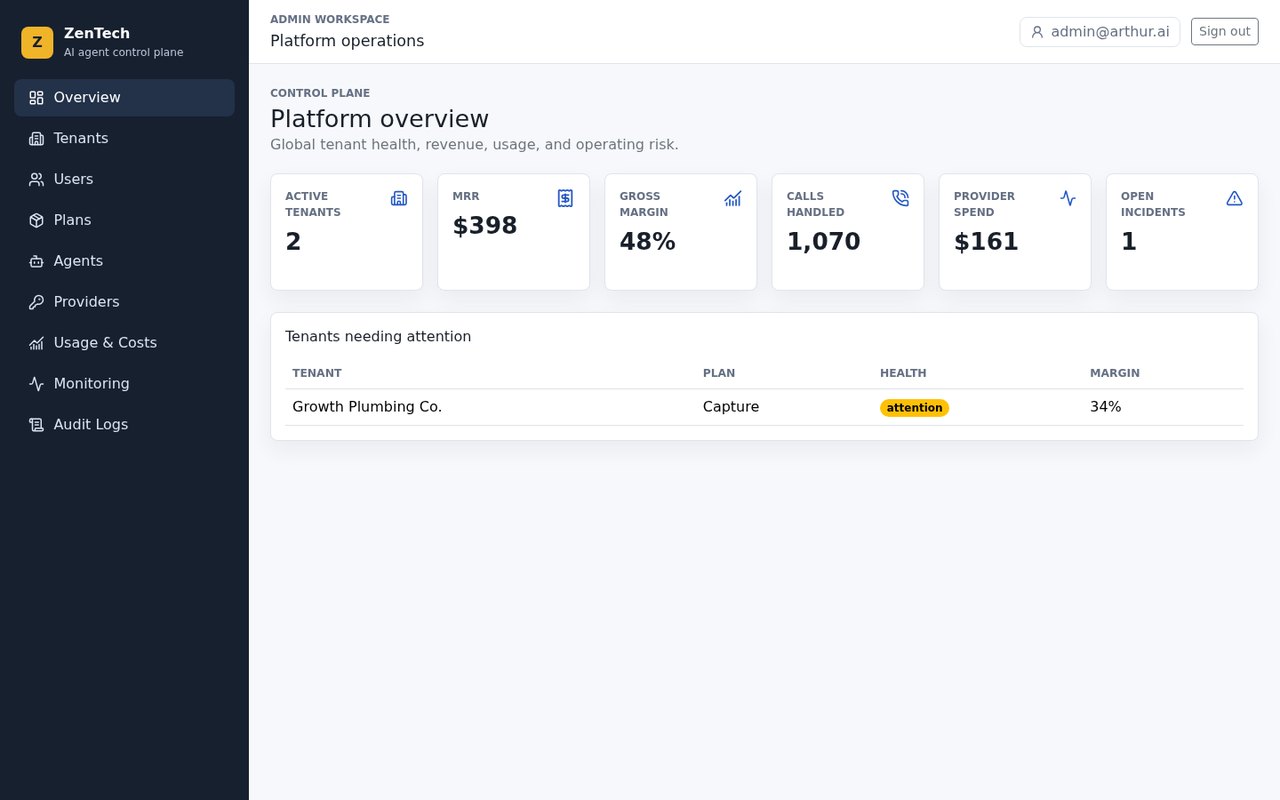
Platform overview in this capture: two active businesses, recurring-revenue and provider-cost tiles, call volume across customers, and one company flagged for attention. Without this page the operator lives in spreadsheets and chat groups.
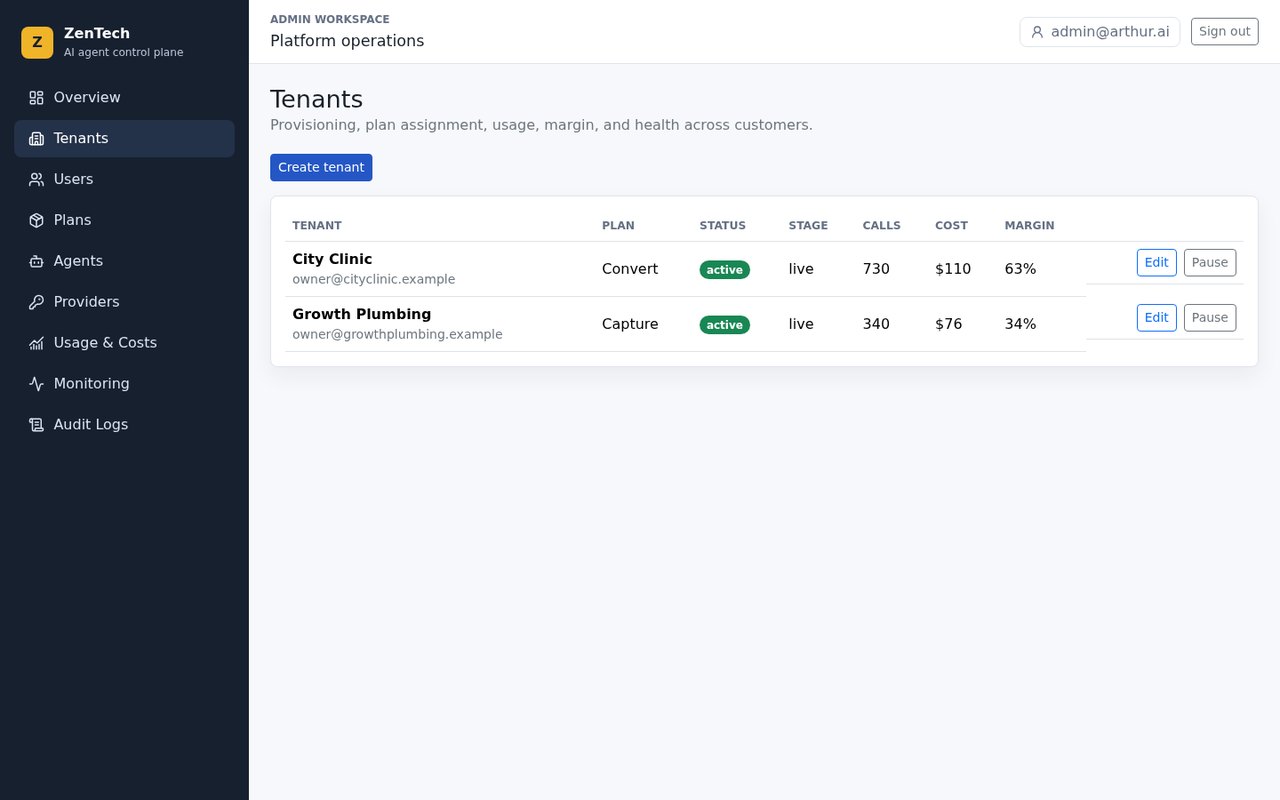
Tenant list: onboard a company, assign a plan (Capture vs Convert in this evaluation), pause if they stop paying or go on holiday, compare call volume and cost. A plumber does not use this screen every day. A franchise or reseller does.
Owner and staff — same shop, different keys
The owner’s question: “What happened on the phones while I was on a job?” The staff question: “What do I call back this morning?”
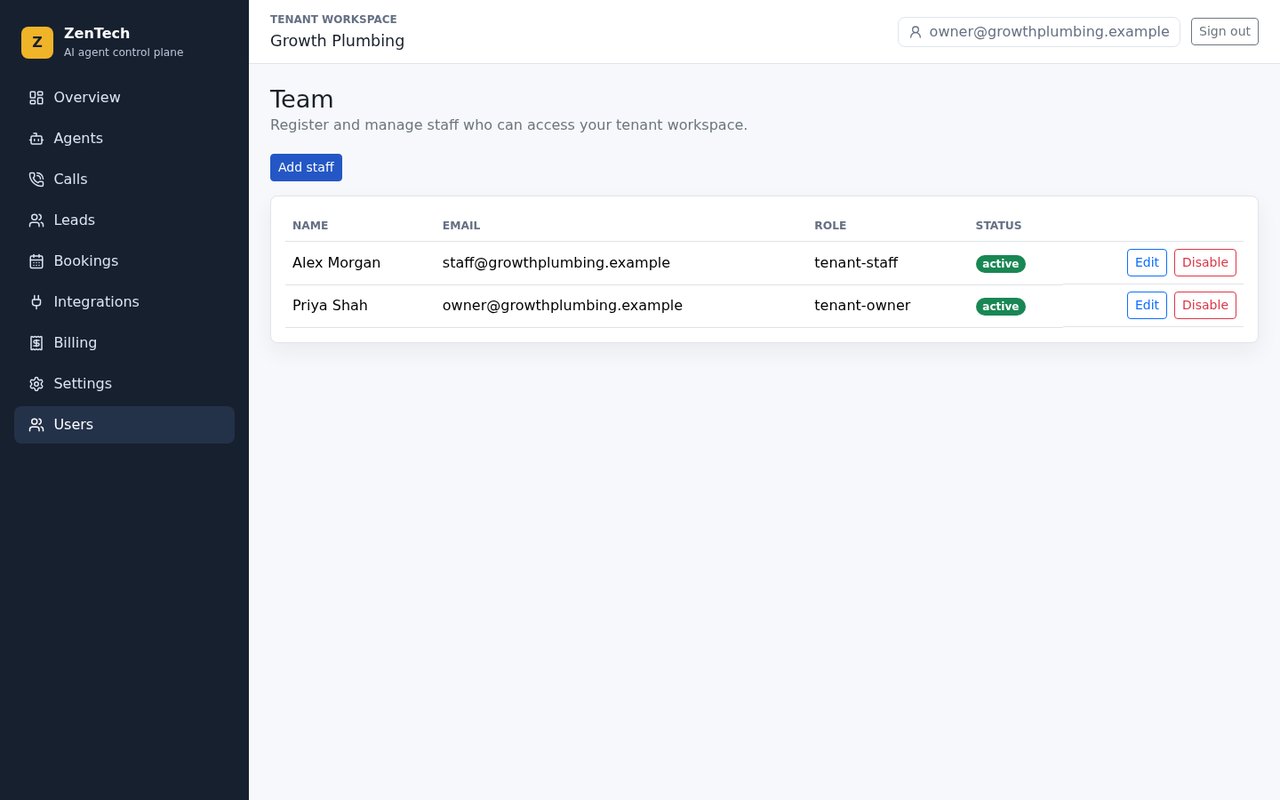
Owners add a coordinator, change a role, or disable access when someone leaves. You should not share one office-PC password. Evaluation names and emails stay on the glass; they are not listed here as credentials.
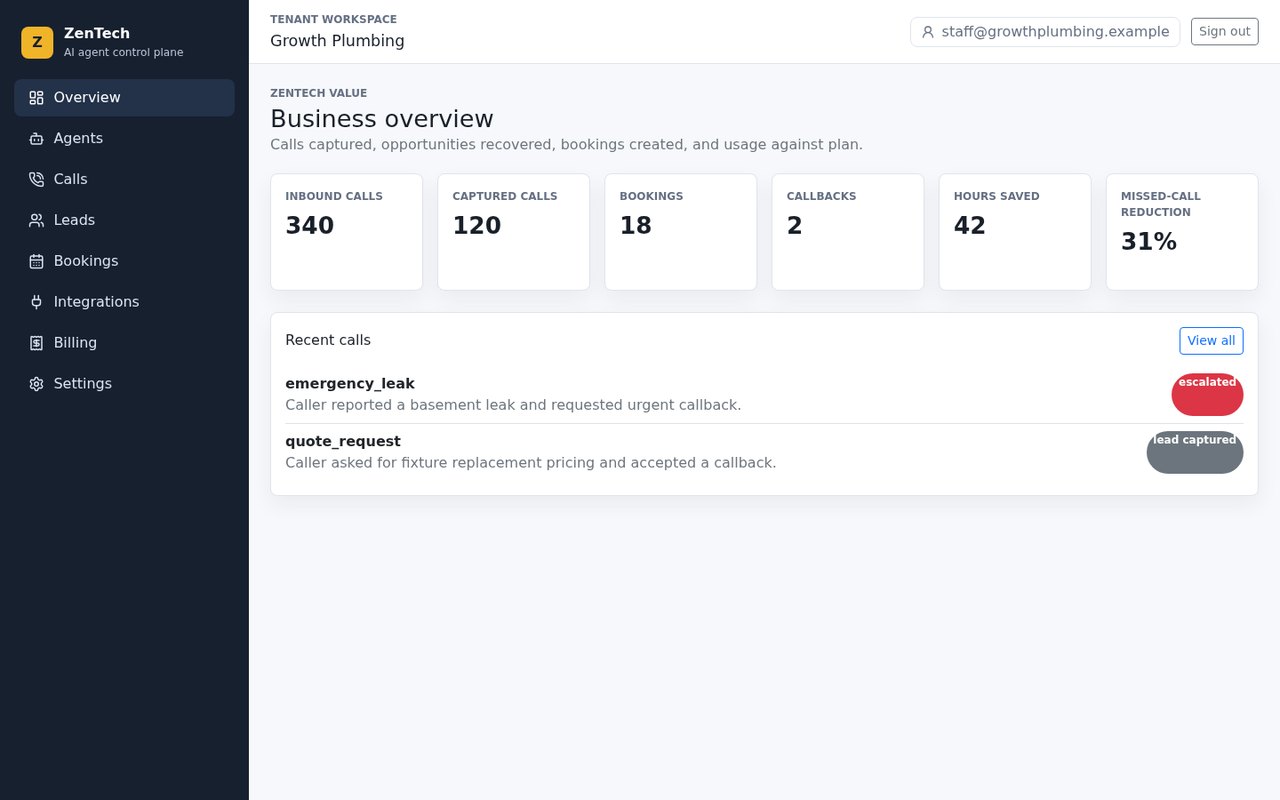
Staff home looks like the owner’s home on purpose — they still need calls, leads and bookings. Look at the left menu: there is no Users item. They cannot open head-office screens. If they try, the API sends them back to their own shop.
A different business, the same product
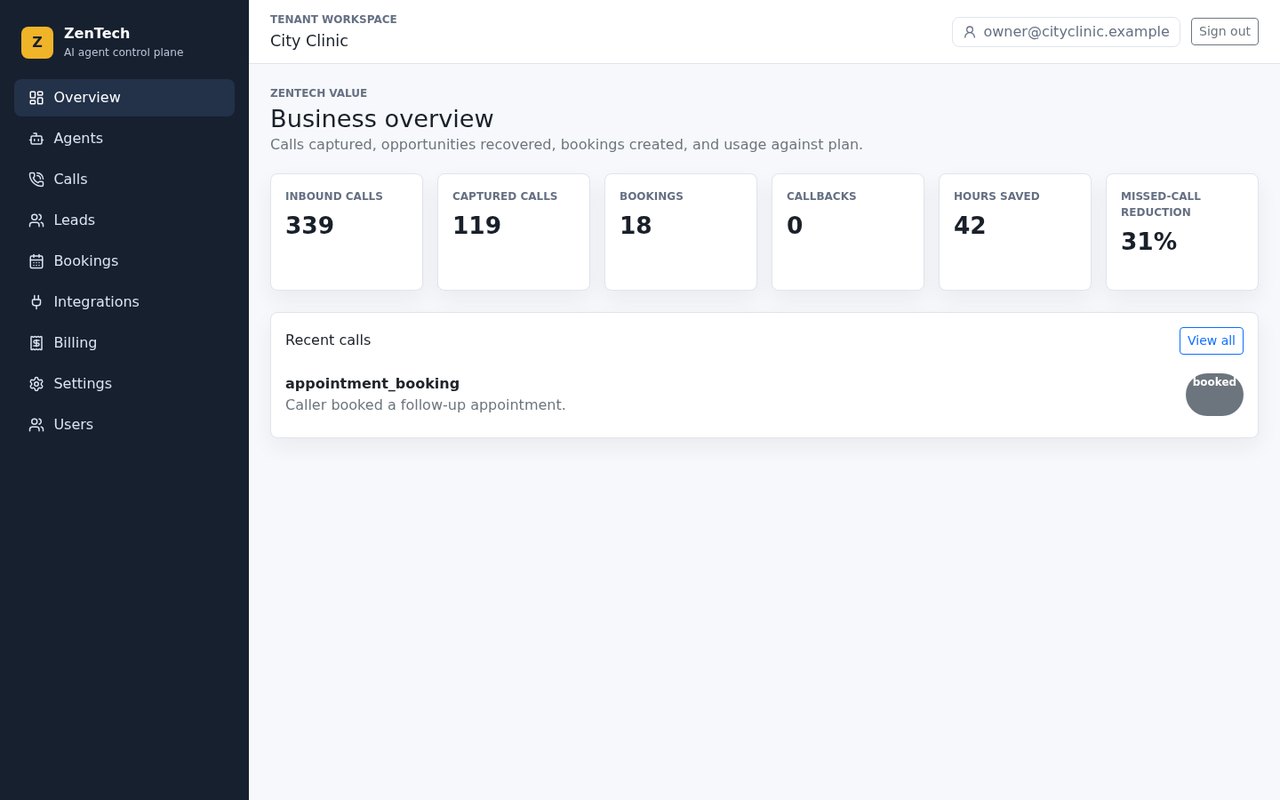
City Clinic in this evaluation wants follow-up appointments, not leak emergencies. Latest call is booked, not escalated. Callbacks waiting: none in this capture. Whose data? Only the clinic. Growth Plumbing never sees patient bookings. That is how you run many businesses on one platform and still stay professional.
What the AI does on the call
- The caller dials the usual number.
- If staff cannot pick up, the agent answers.
- It greets, asks what they need, and classifies the request.
- It writes a summary a human can read in ten seconds.
- Urgent work can alert the on-call person. A booking can land on the calendar.
- Everything appears on the screens above.
You still talk to customers. The agent takes first contact so the job is not lost. Scripts, hours and “what is urgent” are tenant settings — not a one-prompt shop.
Engineering challenges
- One shared login for the office PC → you cannot fire one person without changing everyone
- A list of companies in one table with no row rule → the plumber sees the clinic
- Staff menus that still expose Users or billing → the receptionist can lock the owner out
- Live AI and phone keys required to demo the portal → nobody can evaluate the product
- Confusing this portal with the RTP turn engine → buyers think they bought a widget, not a tenant OS
How those were solved
JWT plus three roles. Tenant-scoped APIs. Navigation from bootstrap so staff never see the keys they cannot use. Provider adapters with a mock mode for evaluation. Asterisk voice AI stays the media-path case; this page stays the receptionist SaaS.
My role
Architecture + Vue portal + FastAPI SaaS plane + Asterisk ARI adapter wiring. Evaluation logins and live provider secrets stay off this page.
Architecture Vue 3 FastAPI Asterisk ARI JWT / RBAC
Technology stack
Vue 3, Vue Router, Pinia, Bootstrap, Vite. FastAPI for login, roles, calls, leads, bookings and billing summaries. JWT access/refresh in production auth mode. SQLite for evaluation identity; PostgreSQL for production tenant records. Asterisk via ARI. Optional calendar and messaging providers. This page does not add a REST encyclopedia, NestJS, or a FusionPBX reskin.
Production considerations
- Tenant isolation on calls, leads and billing — evaluation seed ≠ production SLA.
- ARI events must not block HTTP workers — queue or worker pool for voice spikes.
- Staff role cannot reach owner billing or platform admin routes.
Engineering outcomes
No invented faster-percent claims. What this system actually established:
- A signed-in portal for platform operators, tenant owners and tenant staff
- Two isolated evaluation workspaces — field service vs clinic — on the same product
- Owner can manage team access; staff cannot
- Calls written up as leads, bookings or escalations instead of a voicemail pile
- Provider adapters so evaluation does not require live AI or phone keys
- A clear split from the Asterisk voice AI RTP case
What “good” looks like after a pilot is the team opening this website instead of reconstructing the day from voicemail. Exact recovered-job counts depend on your volume, scripts and how fast people work the list.
Architectural insight
If the voice agent answers and the office still has no queue, you built a talking voicemail. If two companies share a login, you built a leak. The receptionist product is the tenant OS — roles, isolation, the morning list — with the PBX and the model as adapters behind it.
Related: Asterisk voice AI (RTP turn engine), production AI voice agent, and AI call center when the buyer is a seat-selling CCaaS, not a two-van shop.
FAQ — buyer & architecture questions
Ten common questions about this case study, fit, and engagement.
Missed calls are missed jobs?
Share the number, what is urgent, and who should see the morning list. The first reply is whether this is a receptionist SaaS, a CCaaS seat product, or the RTP path.
Discuss Your Project