- Industry
- Self-hosted business phone
- Type
- UnifiedPBX · Asterisk 22 control plane
- Role
- Architecture + full-stack + telephony
- Engine
- Asterisk 22 LTS · PJSIP · AMI / ARI
- Stack
- Next.js · NestJS · PostgreSQL · Redis
- Walkthrough
- 21:09 on the demo page
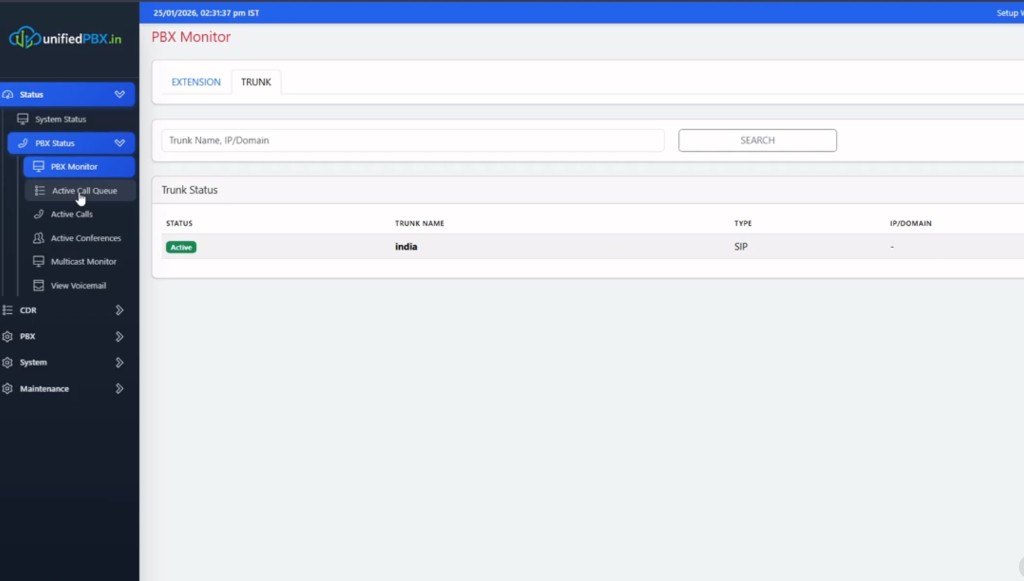
PBX Monitor in this capture: Trunk tab, one Active SIP trunk named india, IP/domain blank in the grid. That is lab state, not a published carrier SLA.
The problem
A FreeSWITCH XML tree, an extensions.conf you SSH into, and a spreadsheet of queues are three sources of truth. They drift. AMI scripts that sanitize a queue name in three places create a fourth. Operators then cannot tell whether the admin saved, Asterisk reloaded, or only the dashboard lied.
Constraints
Delivery stayed inside the client's stack, tenancy, compliance and media-ownership boundaries. Where a choice was forced (suite vs owned plane, BYOC vs CPaaS, local vs cloud models), the architecture section below records the trade-off rather than a marketing rewrite.
Hosted per-seat PBX also fails a different buyer: the company that wants the recordings, trunks and extensions on a box they can inspect — Asterisk 22 LTS, not a locked UCaaS SKU.
Business requirements
One signed-in administration UI for status, CDR, extensions, groups, trunks, inbound/outbound routes, restrictions, IVR, queues and conference. The database is what you would restore. Asterisk consumes generated files and runtime commands. The browser never talks AMI.
The solution
UnifiedPBX is the signed-in product. Next.js renders IP PBX Administration (JWT over REST and a UI-safe WebSocket). NestJS is the control plane: tenants, users, config writes, AMI command socket, ARI call control, config generation, job producers. PostgreSQL holds tenants, extensions, calls, CDR, queues (including a persisted canonical Asterisk name), trunk health, network health and jobs. Asterisk 22 LTS terminates SIP/RTP.
Redis and BullMQ take work off the request path: network apply/VPN/routes, and trunk heartbeat checks. Workers can be scaled separately. Prometheus text is available to scrape; the dashboard also reads JSON health endpoints so a Prometheus server is optional.
This is the same UnifiedPBX product as the public Asterisk 22 walkthrough. It is not the confidential multi-tenant UCaaS case — that remains Multi-Tenant IP PBX.
How the system flows
Admins change extensions in Next.js; NestJS writes PostgreSQL and regenerates Asterisk 22 configs — AMI reloads without SSH snowflakes.
flowchart LR
  UI[Next.js admin change] --> API[NestJS validate tenant]
  API --> PG[(PostgreSQL)]
  PG --> Gen[Generate pjsip queues dialplan]
  Gen --> AMI[Debounced AMI reload]
  AMI --> AST[Asterisk 22 executes]
Architecture
Face, brain, muscle. Isolation is an API and row rule, not a prefix in a shared dialplan.
flowchart TB
  UI[Next.js admin JWT WebSocket]
  API[NestJS tenants generate AMI ARI]
  PG[(PostgreSQL source of truth)]
  Redis[Redis BullMQ heartbeat]
  Conf[Generated conf files]
  AMI[AMI peers queues]
  ARI[ARI originate bridge]
  AST[Asterisk 22 LTS]
  UI --> API
  API --> PG
  API --> Redis
  API --> Conf
  Conf --> AST
  AMI --> AST
  ARI --> AST
Key components
Config generation
Dialplan and queue files are written from DB, then a debounced safe reload. Queue identity is the persisted Asterisk name, reused for files, AMI and telemetry.
AMI HA shape
Separate event vs command sockets, action IDs, a watchdog on silent sockets, circuit breaker and backoff. Streaming CLI dumps are blocked so the FSM cannot desync.
Trunk health
Heartbeat worker plus health rows (state, score, setup time, consecutive failures). Failure rate is computed from attempted vs failed calls — not a hard-coded zero.
Network path
A background monitor writes LAN/WAN/VPN/NAT into network_health. The HTTP API reads the table instead of shelling out on every System Info click.
Status, performance and CDR
Left nav in this session: Status (system, PBX monitor, active calls, conferences, multicast, voicemail), CDR (detail, conference recording, extension summary), PBX (extensions through SIP settings), System, Maintenance. Chrome shows a lab clock on 25 Jan 2026.
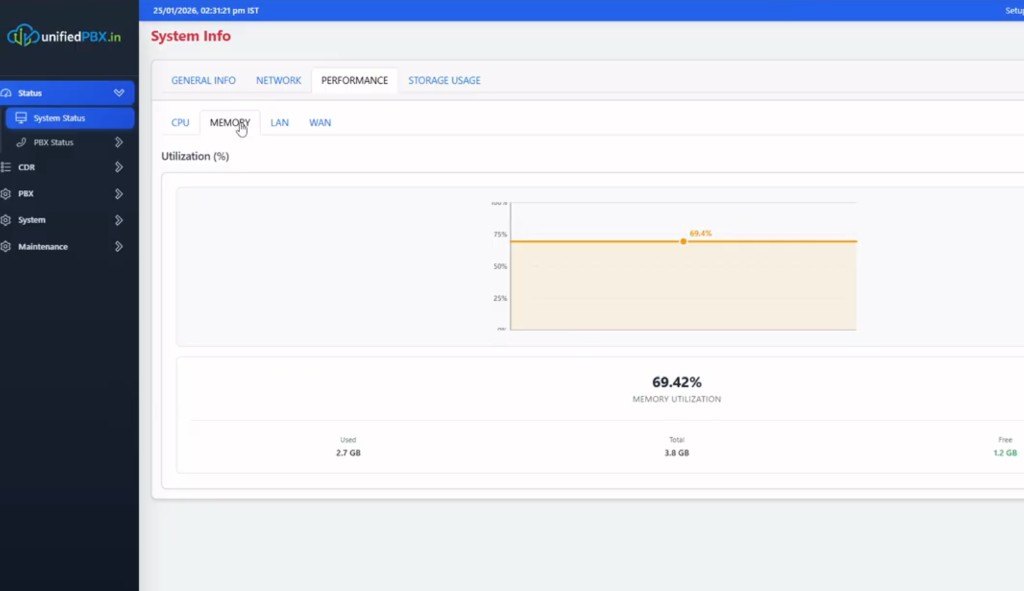
Performance → Memory in this capture: about 69% of 3.8 GB used. That is a lab snapshot, not a capacity guarantee.
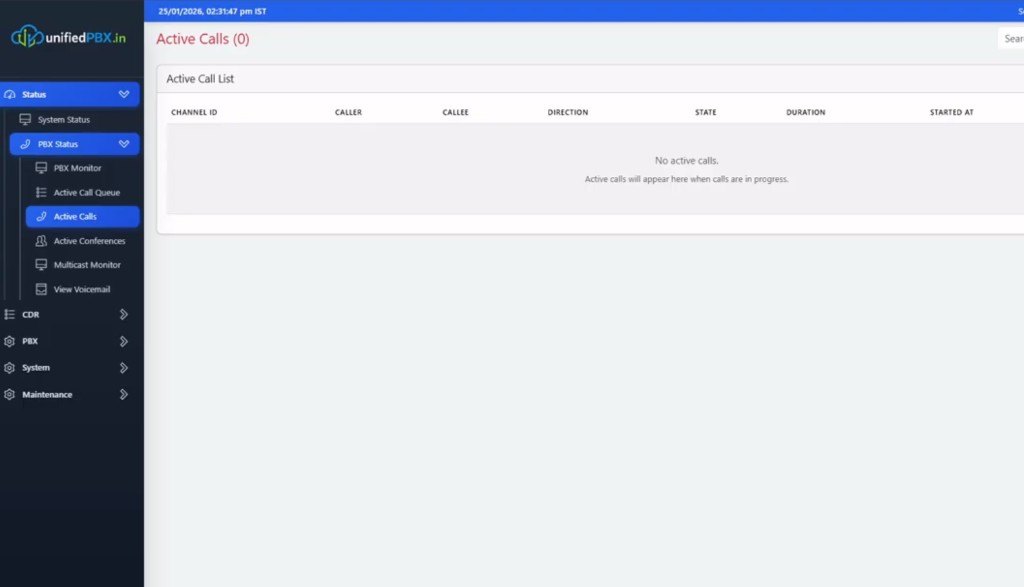
Active Calls was empty (0). The columns exist: channel, caller, callee, direction, state, duration, started at.
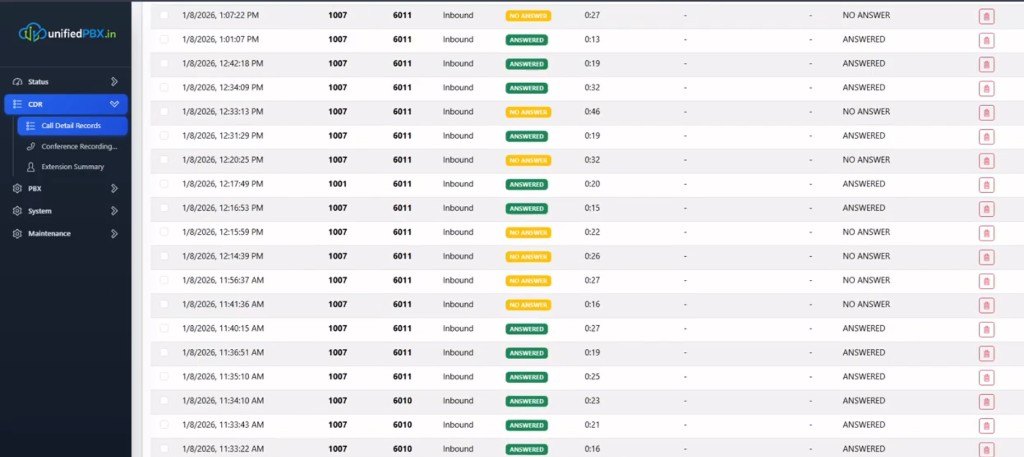
CDR rows in this capture are inbound lab extensions (1007 / 1001 → 6011 / 6010) with ANSWERED and NO ANSWER. Recording icons sit on the row. These are demo numbers, not published customers.
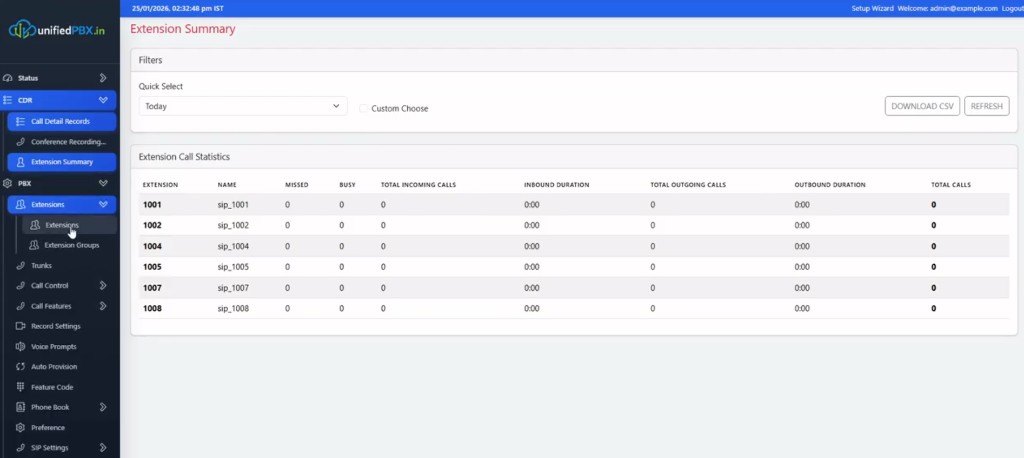
Extension Summary: Today filter, CSV download, extensions 1001–1008 as sip_100*. Counts are zeros in this pass of the recording — the grid is the product, not a traffic claim.
Extensions and groups
Add Extension is tabbed Basic / Features / Advanced. Features in this capture: voicemail enable, prompt attachment, keep-local, monitor mode, call-forwarding (always / busy / no answer / not registered) with target type extension or ring group, Follow Me, DND, mobility/secretary. Voicemail password on the form is empty here and is not dumped.
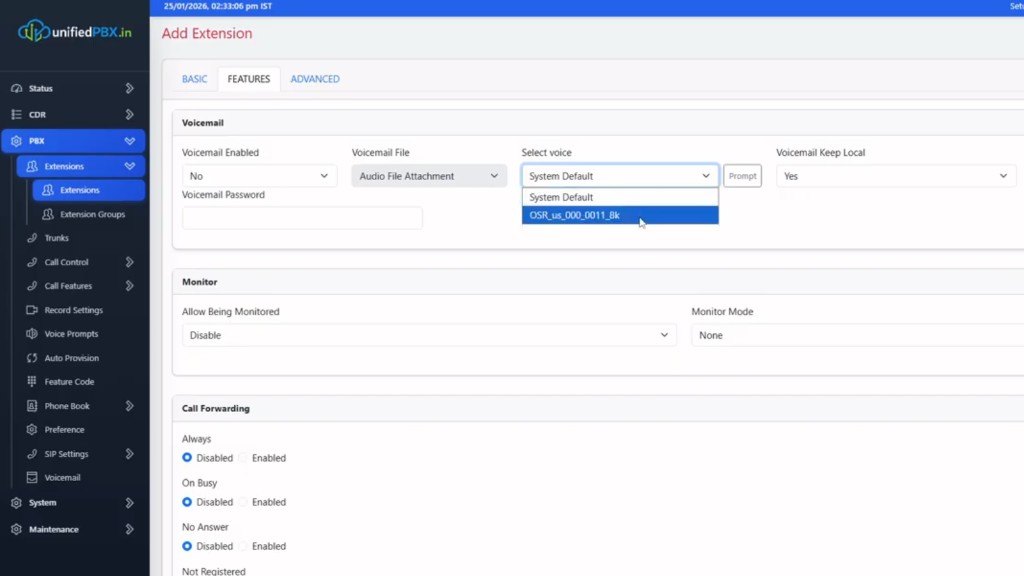
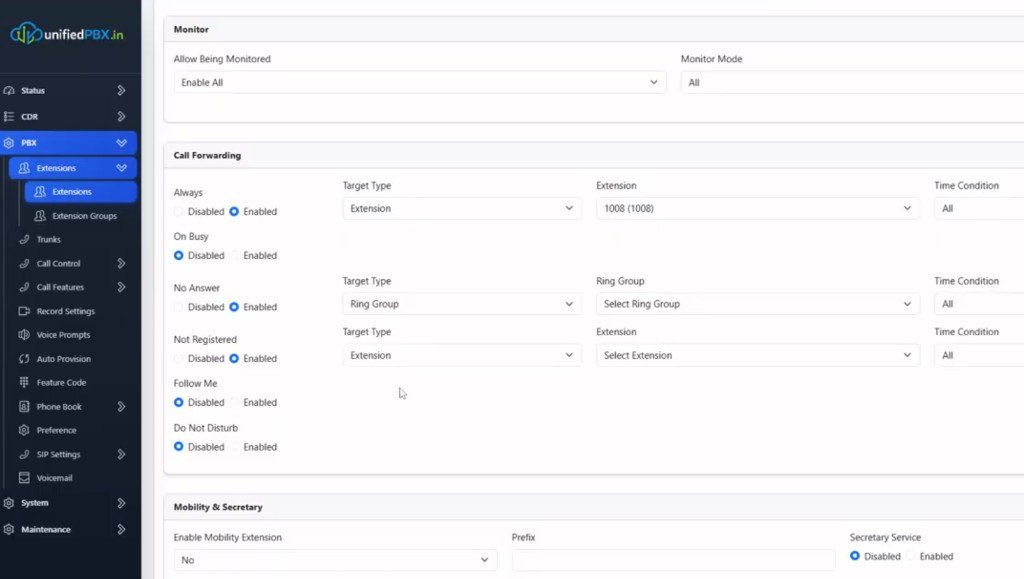
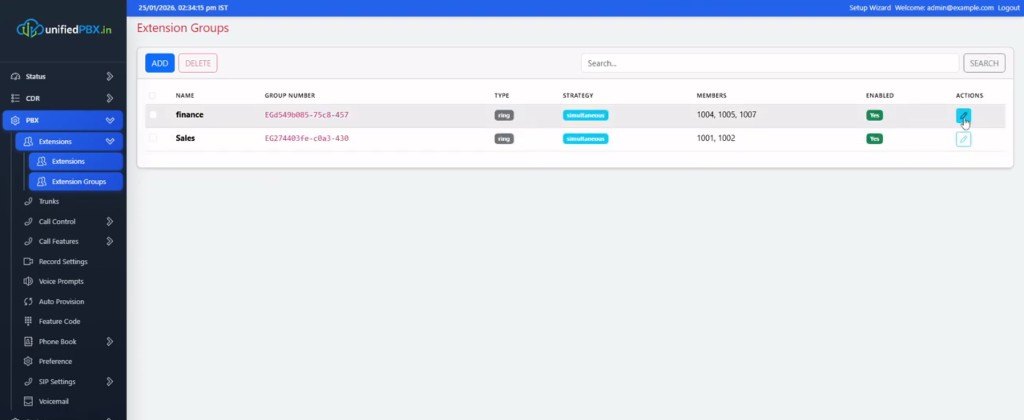
Extension Groups: finance (1004, 1005, 1007) and Sales (1001, 1002), both ring / simultaneous, enabled. Group numbers are UUIDs in this lab — the display name is what operators use.
Trunks, inbound and outbound
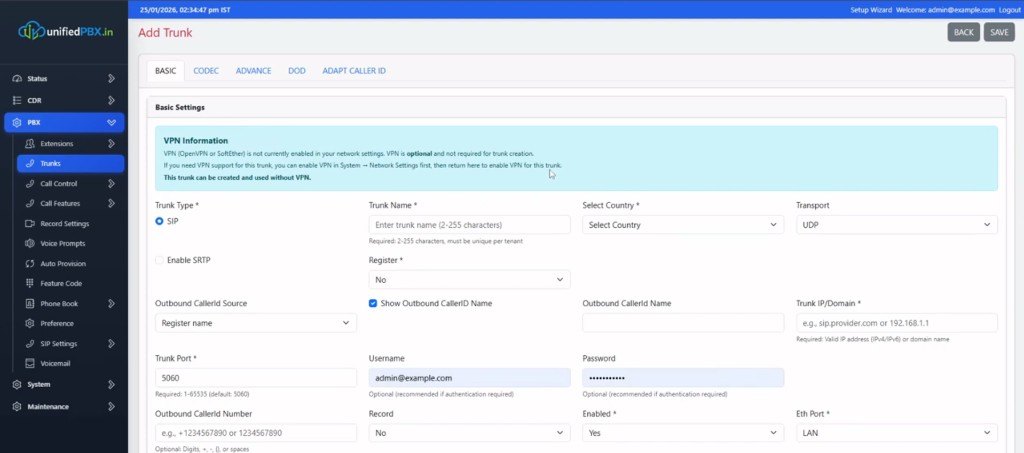
Add Trunk: SIP (UDP 5060 in the form), optional SRTP, register flag, outbound caller ID, country, VPN note that OpenVPN is optional. Username on the form is a lab example.com address; the secret is masked and is not published.
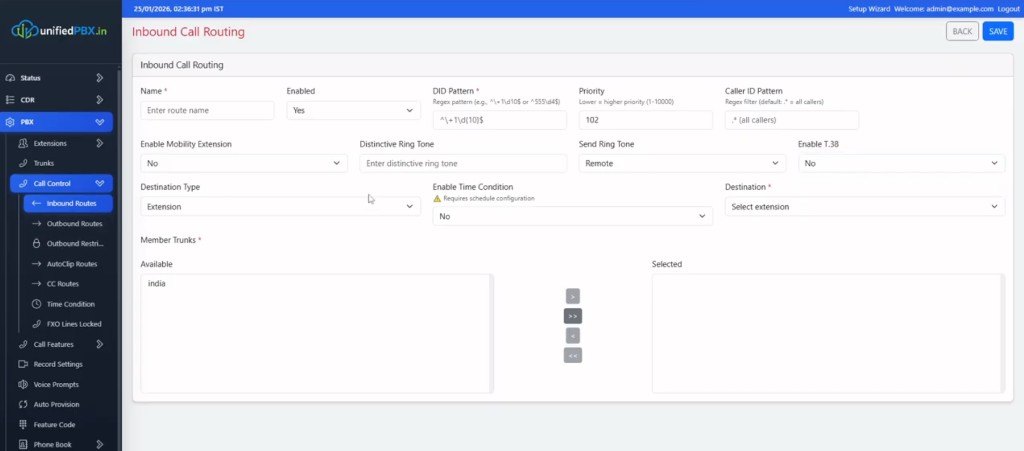
Inbound: name, DID regex, caller-ID regex, priority, destination type (extension in this capture), member trunks with india available to select. Time-condition and T.38 flags sit on the same form.
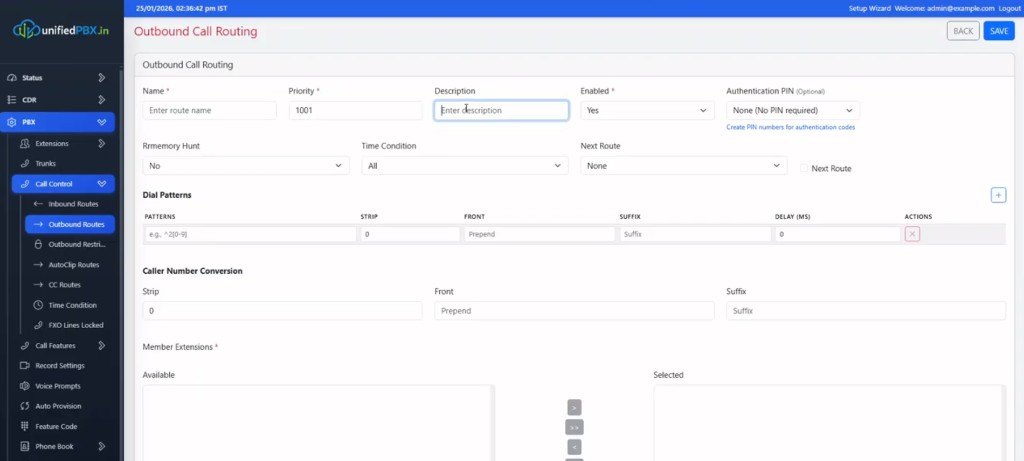
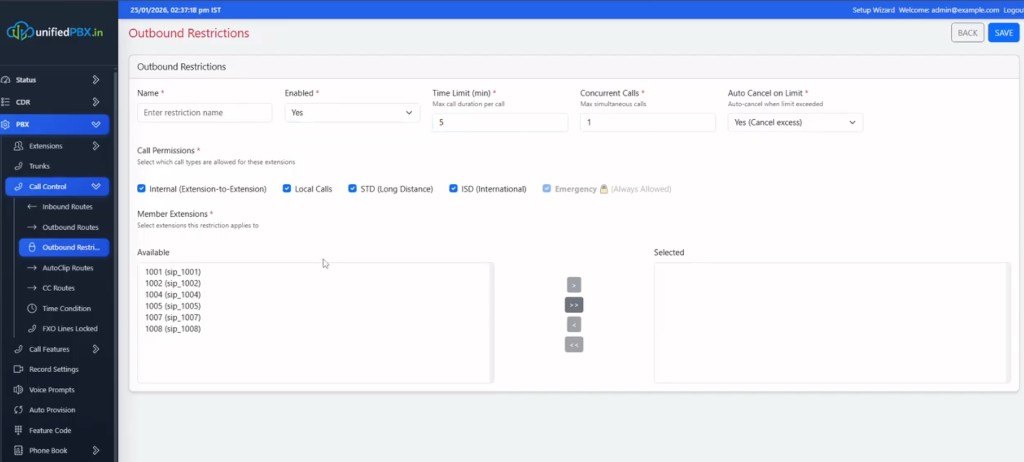
Outbound routes: priority, memory hunt, time condition, next-route, dial-pattern strip/prepend, caller-number conversion, member extensions. Restrictions: time limit, concurrent calls, auto-cancel, permissions for internal / local / STD / ISD / emergency, then which extensions inherit the rule.
IVR, conference and queues
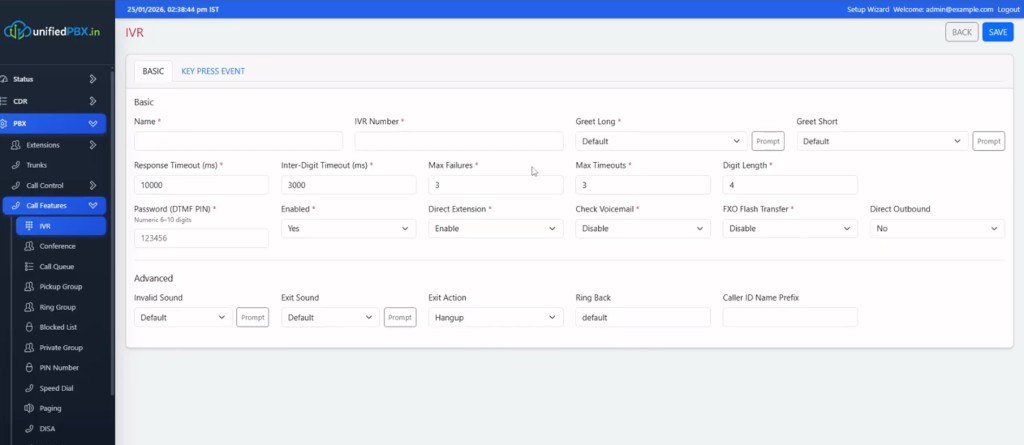
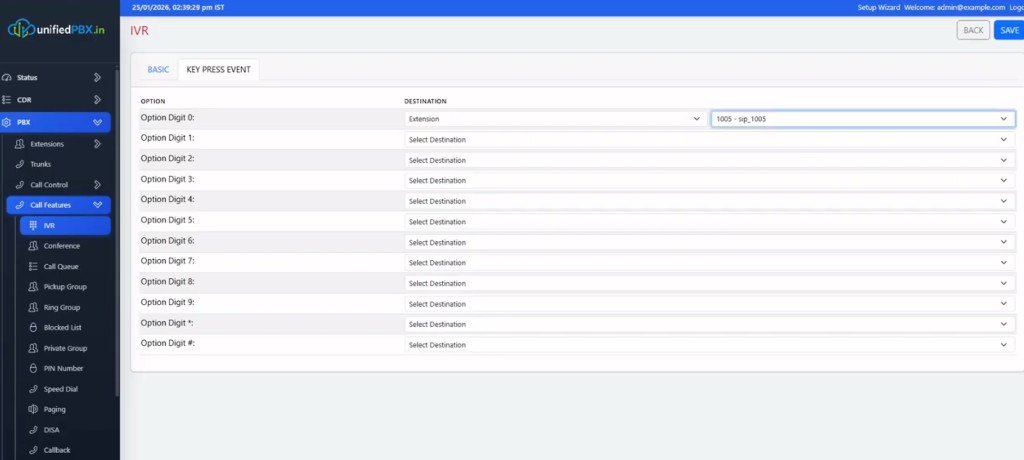
IVR Basic: timeouts, max failures, digit length, greet long/short, direct extension, FXO flash, exit action. A numeric DTMF PIN field is filled in this capture — it is a demo value and is not copied into this article. Key Press Event maps digits 0–9, * and # to destinations (extension 1005 selected on digit 0 in this pass).
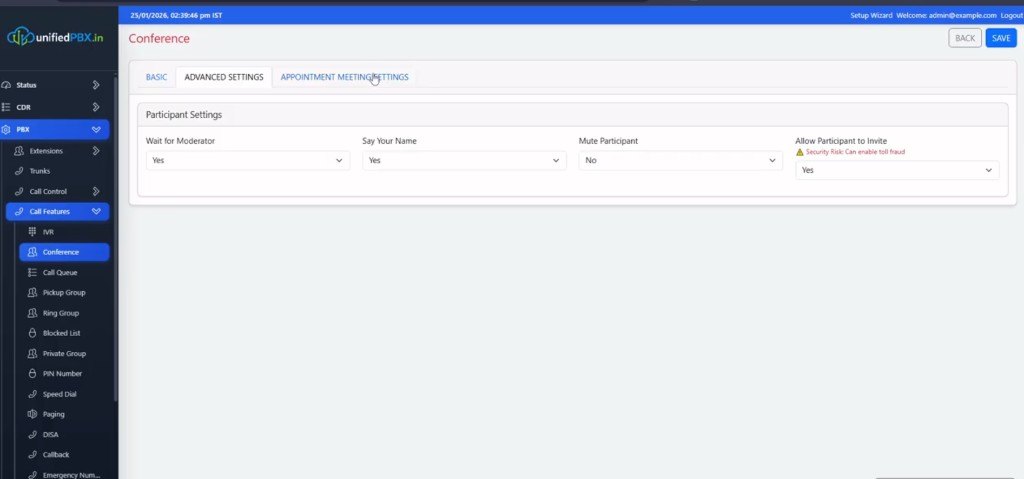
Conference → Appointment Meeting Settings: wait for moderator, say-your-name, mute participant, allow-invite (flagged as a fraud risk in the UI). That warning is product copy on the form — this page does not claim a shipped anti-fraud engine.
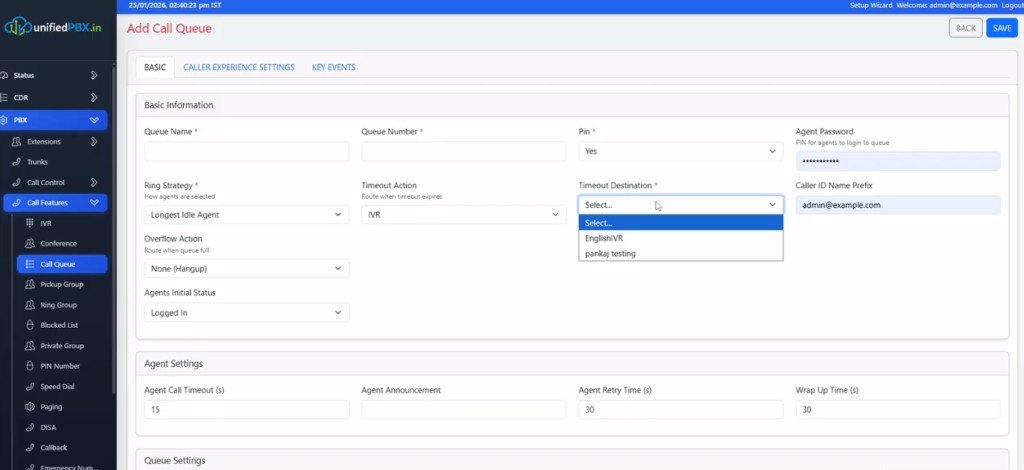
Add Call Queue: name/number, PIN for agents, ring strategy (Longest Idle Agent), timeout action IVR, overflow hangup, wrap-up and retry timers. Timeout destination dropdown in this capture lists lab IVR labels. Caller ID prefix on the form is a demo address — not a published mailbox.
Walkthrough video
One recording already lives as a watch page (one video per URL). This case study is the screenshot map; the demo owns VideoObject.
- Self-Hosted Asterisk 22 Business Phone System — YouTube B3DOaPVVHpc (21:09)
Engineering challenges
- Three places sanitizing a queue name → AMI, files and the dashboard disagree
- AMI event socket mixed with commands → streaming status dumps desync the client
- Network/VPN probes on the HTTP request → System Info blocks for seconds
- Trunk “healthy” while failure rate stays 0.0 because attempts were never counted
- Raw AMI/ARI on the browser → tenant crosstalk and an unversioned protocol in the SPA
How those were solved
Persist the Asterisk identifier on the queue row. Dual AMI sockets, one action at a time, watchdog and circuit breaker. Background network monitor writes network_health; APIs read it. Trunk health stores attempted vs failed calls. WebSocket emits normalized, tenant-scoped events; queue stats snapshots are throttled.
My role
Architecture + full-stack + Asterisk integration. Control plane, generated PJSIP/dialplan, AMI/ARI, admin UI, workers and the public walkthrough. Lab passwords and live carrier secrets stay off this page.
Architecture NestJS Next.js Asterisk 22 AMI / ARI PostgreSQL
Technology stack
Next.js, NestJS, PostgreSQL, Redis/BullMQ, Asterisk 22 LTS, PJSIP, AMI, ARI. JWT on the admin API. Optional Prometheus scrape beside JSON metrics. This page does not add FreeSWITCH or a RAG stack that was not on these screens.
Engineering challenges
- Single source of truth — PostgreSQL vs generated conf vs AMI state.
- AMI reliability — separate event/command sockets, circuit breaker, no desync from streaming CLI.
- Queue identity — one persisted Asterisk name across files, AMI and UI.
- Trunk health — heartbeat worker and failure rate from real attempts.
My role
Architecture and full-stack engineering — Next.js admin, NestJS control plane, config generation, AMI/ARI integration, PostgreSQL schema and production-oriented ops (Redis jobs, health endpoints).
Technology stack
Production considerations
- Debounced reload after config generation; rollback via last-known-good rows.
- Network health table instead of shelling out on every dashboard click.
- Prometheus-friendly metrics optional; JSON health for operators without Grafana.
Engineering outcomes
No invented faster-percent claims. What this system actually established:
- A signed-in admin for status, CDR, extensions, groups, trunks, inbound/outbound, restrictions, IVR, queues and conference
- PostgreSQL as configuration source of truth, with generated Asterisk files
- AMI for runtime/peers/queues, ARI for call lifecycle — not a mash in the browser
- Canonical queue Asterisk names so files, AMI and telemetry share one identifier
- Background network and trunk-heartbeat workers instead of blocking OS calls on every dashboard hit
- A 21:09 public walkthrough on its own watch page
Architectural insight
If operators edit pjsip.conf and the admin, you have two products. If PostgreSQL owns the row and Asterisk only consumes generated output plus AMI/ARI, you have one PBX. Isolation that exists only as a naming convention in the dialplan is not isolation.
Related: the confidential multi-tenant IP PBX / UCaaS case (shared cores, many companies) and Asterisk development.
FAQ — buyer & architecture questions
Ten common questions about this case study, fit, and engagement.
Building a UnifiedPBX you can actually operate?
Share whether the gap is generated config, AMI/ARI, queue identity, or the admin. The first reply is whether the problem is the core, the files, or the control plane.
Discuss Your Project