2026 BUYING BRIEF
Can you build my operational system?
Who this is for. Businesses that have outgrown spreadsheets, disconnected SaaS tools or generic CRM/ERP platforms.
What you get. A business workflow model, application architecture, data model, role/permission model, API plan and a production-ready CRM/ERP platform—not a feature checklist.
When custom makes sense. Specialized workflows, complex roles, industry-specific rules, multi-system integration, billing requirements, or communication that standard software cannot model cleanly.
Searches this page answers: custom CRM development · custom ERP development · CRM ERP development · industry-specific CRM · custom business software · telecom ERP · insurance CRM · multi-tenant CRM
When should you build a custom CRM/ERP?
We don’t start by deciding that everything needs to be custom. We start by understanding the workflow and deciding what should be bought, integrated, extended or built.
| Approach | When it fits |
|---|---|
| Configure | Your process is standard enough that an existing platform already solves it. |
| Integrate | Existing systems are good individually but disconnected. |
| Extend | An existing CRM/ERP handles ~70–80% but misses important workflows. |
| Build | The workflow itself is part of your competitive advantage. |
| Replace | The current system blocks scale, integration or data ownership. |
We don’t recommend custom development when an existing product already solves the problem. Engineering capability lives under Custom CRM & ERP; this page is the outcome decision.
Who owns the business record?
A CRM/ERP isn’t just screens. The CRM/ERP remains the system of record. Voice, messaging, automation and AI operate around that record through controlled APIs and workflows.
                    BUSINESS WORKFLOW
                           │
                           ▼
                    CRM / ERP CORE
                           │
             ┌─────────────┼─────────────┐
             │             │             │
            RBAC          DATA          APIs
             │             │             │
             └─────────────┼─────────────┘
                           │
             ┌─────────────┼─────────────┐
             ▼             ▼             ▼
           Billing       Voice        Automation
                         WebRTC
                           │
                           ▼
                          AI
The edge over a generic product landing page is the same question we ask on voice systems: who owns identity, who owns the record, who owns the call, and what happens when any of those fail?
What can be part of your platform?
Modules are selected around the workflow—not added because they appear on a feature checklist.
| CRM | ERP | Communication | Platform |
|---|---|---|---|
| Leads | Purchasing | SIP | Multi-tenant |
| Customers | Inventory | WebRTC | RBAC |
| Pipeline | Billing | IVR | SSO |
| Follow-ups | Finance | ACD / queues | APIs |
| Activities | HRMS | Recording / CDR | Audit |
| Campaigns | GST workflows | WhatsApp / SMS | White-label |
| Reports | Approvals | Dialer | Billing hooks |
When the CRM needs to make the call
Lead → Assignment → Agent → WebRTC / SIP → Call
  → Recording / CDR → Disposition → Follow-up → Conversion
The call is not a separate event sitting beside the CRM. It becomes part of the customer’s operational history. A lead can move from acquisition to agent assignment, browser calling, disposition, follow-up and billing without leaving the operational system.
Proof: Insurance ERP + WebRTC desk · VoIP CRM & predictive dialer. Related outcomes: AI Call Center, WebRTC softphone.
Built around real operating workflows
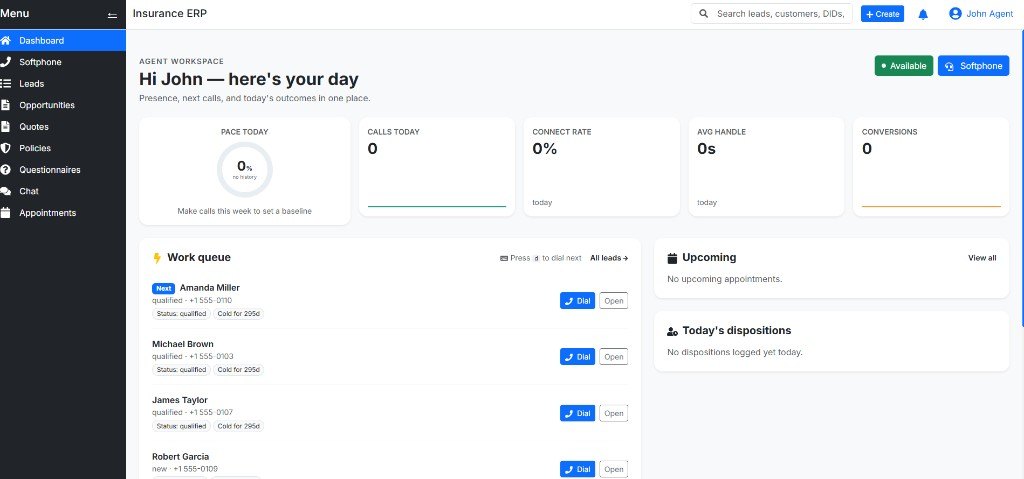
Insurance ERP
The customer/lead record and browser calling share the same workflow.

VoIP CRM & predictive dialer
CRM workflow connected directly to the communication layer.
View all CRM/ERP case studies → · See the working systems →
| If you need… | Start here |
|---|---|
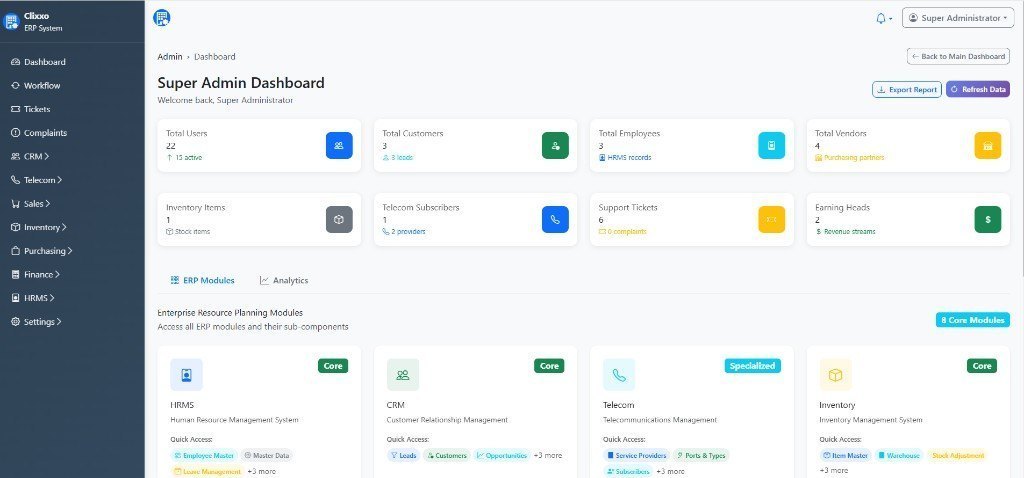
| Ports, slabs, GST-style heads + HR | Clixxo case |
| Agencies, quotes, WebRTC next to the lead | Insurance ERP case |
| Campaigns that actually dial | VoIP CRM dialer |
| Tenancy as a product | Multi-tenant PBX |
| Wider industry map | Industry & product solutions |
Integrate what you already have
Build around the systems that already work. Replace only the parts that don’t.
We can connect existing CRM, ERP, accounting, billing, SIP/PBX, WhatsApp, SMS, payments, HR, REST APIs, webhooks and AI services—without forcing a full rip-and-replace.
What production-ready means
More than a working UI—and the same bar we use on production rescue.
- Data — ownership, validation, migrations and backups.
- Identity — RBAC, tenant isolation and audit trails.
- APIs — documented interfaces and controlled integrations.
- Reliability — monitoring, logging and failure handling.
- Security — TLS, secrets, permissions and secure deployment.
- Operations — deployment, rollback, backups and observability.
From workflow to production
- Discover — business processes, users, roles and constraints.
- Model — data, tenancy, permissions and ownership.
- Architect — application, APIs, integrations and infrastructure.
- Build — frontend, backend, database and workflows.
- Integrate — ERP, CRM, voice, messaging, AI and external systems.
- Deploy — cloud, VPC, VPS or on-premises.
- Operate — monitoring, security, backups and production support.
Technology stack
Technology is selected after the architecture is defined.
- Application: Next.js · React · Vue
- Backend: NestJS · Node.js · FastAPI · Laravel
- Data: PostgreSQL · MySQL · Redis
- Communication: FreeSWITCH · Asterisk · SIP · WebRTC
- AI & automation: OpenAI · Claude · Gemini · RAG · n8n · APIs
- Infrastructure: AWS · Azure · GCP · Docker · Kubernetes
Typically relevant to
- Telecom operators — CRM, billing, inventory, provisioning and HR.
- Insurance agencies / DSAs — leads, agents, quotes, customers and WebRTC.
- SaaS companies — multi-tenancy, RBAC, billing and APIs.
- Manufacturing / operations — orders, inventory, purchasing and workflows.
- Service businesses — customers, scheduling, field ops and communication.
- Product teams — building a vertical SaaS product rather than configuring a generic CRM.
Questions buyers ask before hiring
Direct answers on scope, integration and how to start.
Custom CRM development means building customer, lead and sales workflows around your roles, data model and integrations—not forcing your process into a generic CRM template.
CRM focuses on customers, pipeline and communication. ERP covers broader operations: inventory, purchasing, billing, finance, HR and approvals. Many businesses need both on one login.
Yes. We map who sells, stocks, bills and must not see whom, then design schema, RBAC and portals around those rules—not a generic accounting SKU.
Yes. REST APIs, webhooks, SIP/WebRTC desks, WhatsApp/SMS and payment or accounting connectors can extend what you already run instead of a full rip-and-replace.
Yes. Click-to-call, screen-pop, recording and disposition from the same tenant_id is how insurance and VoIP CRM cases are built.
Yes. Tenancy, RBAC, billing hooks, admin consoles and APIs are first-class—whether or not FreeSWITCH/Asterisk is in the stack.
Yes. Softphones, trunks, monitoring and dialer paths can sit beside the CRM record so agents do not leave the desk to place a call.
Yes. Messaging can share customer identity with CRM/ERP workflows; see also multi-tenant SMS/WhatsApp CPaaS when messaging is the product.
Yes. Migrations are phased: inventory of entities, mapping, dry runs and cutover with rollback—not a weekend dump into an unknown schema.
Yes. Many engagements begin with a short workflow and stack review. If the fit is good, scope expands from evidence—not a generic sales deck. Use the project brief or email hello@unifiedpbx.in.
Have a workflow your current CRM or ERP cannot handle?
Send the current workflow, screenshots, existing systems and the biggest operational problem. We’ll start with the architecture—not a generic feature list.
Discuss Your CRM/ERP See built systems