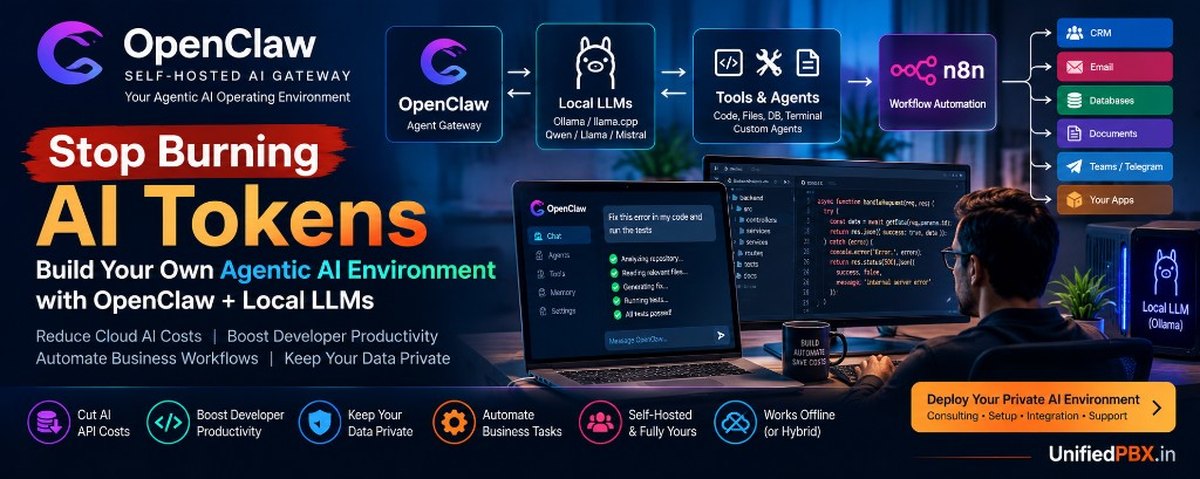
A practical guide to self-hosted AI agents, local LLMs, coding automation, workflow orchestration, and reducing recurring AI API costs
By UnifiedPBX.in | AI Agent Architecture, Developer Automation & Self-Hosted AI Systems
1. The Hidden Cost of Depending on Cloud AI for Everyday Work
AI coding assistants and agentic AI tools are changing how developers build software. They can analyze repositories, generate code, investigate bugs, write tests, review documentation, and automate repetitive engineering tasks.
For businesses, AI agents can also process customer enquiries, summarize documents, classify leads, update internal systems, and coordinate workflows.
But there is a growing operational problem: many AI-powered workflows depend on paid model APIs, usage-based subscriptions, and recurring token consumption.
Consider a developer who uses AI throughout the working day. A single task might involve:
- Sending repository context to an AI model.
- Asking the model to analyze an error.
- Providing source files and logs.
- Generating a proposed fix.
- Reviewing the updated code.
- Generating and correcting tests.
- Repeating the process when the first result is incomplete.
In agentic workflows, the model may be called multiple times for one task. Tool definitions, conversation history, retrieved files, and previous results can increase the total input-token consumption.
A similar problem occurs in businesses that process thousands of documents, customer requests, or support tickets.
The result is that AI costs can grow with usage, while organizations may have limited visibility into which tasks generate the greatest expense.
The solution is not to abandon cloud AI. It is to stop using expensive cloud inference for every task when a suitable local model can handle it.
A self-hosted agentic AI environment provides another option: run supported models on your own hardware, give agents access to approved tools, and automate recurring tasks through a controlled architecture.
This article explains how to build that environment around OpenClaw, local LLMs, coding tools, and workflow automation.
2. What Is OpenClaw, and Why Does It Matter?
OpenClaw is a self-hosted AI gateway that connects supported messaging channels to AI assistants and coding agents. It supports tool use, sessions, memory, multiple channels, and agent routing, depending on the configuration.
Unlike a simple chat interface, OpenClaw can serve as an access and orchestration layer for an assistant that operates through approved tools and connected applications.
Official website and documentation:
- [https://openclaw.ai/](https://openclaw.ai/)
- [https://docs.openclaw.ai/](https://docs.openclaw.ai/)
OpenClaw is particularly relevant to developers and technical teams that want to access an AI assistant from supported messaging applications while maintaining control over their own gateway and configuration.
Depending on the deployment, users can build workflows around tasks such as:
- Asking an assistant to inspect an application error.
- Requesting a summary of project documentation.
- Delegating a coding task to a configured coding agent.
- Running approved commands in a controlled environment.
- Accessing selected internal information.
- Coordinating tasks across agents and tools.
- Triggering business processes from a supported messaging channel.
However, OpenClaw is not a magic replacement for every cloud AI coding service. Its capabilities depend on the model provider, connected tools, permissions, and runtime environment.
A local model may be suitable for basic coding assistance but struggle with a large codebase, complex debugging, or long multi-step tasks. Model selection and evaluation are therefore essential.
3. The Architecture: Your Own Agentic AI Operating Environment
The objective is to build a private AI environment that separates the user interface, agent orchestration, model inference, and business execution.
A practical architecture might look like this:
       DEVELOPER / BUSINESS USER
                  |
          Telegram / Web UI
          or supported channel
                  |
                  v
             OpenClaw
       Agent Gateway & Routing
                  |
        +---------+----------+
        |                    |
        v                    v
   Local LLMs          Coding Agents
   via Ollama          or Other Tools
        |                    |
        +---------+----------+
                  |
                  v
       Approved Tool Execution
                  |
       +----------+-----------+
       |          |           |
       v          v           v
   Repository   Files       Databases
       |          |           |
       +----------+-----------+
                  |
                  v
       Results / Review / Logs
An optional workflow automation layer can connect the agent environment to applications and business processes:
OpenClaw
    |
    v
Authenticated Internal API
    |
    v
n8n Workflow Automation
    |
    +--> CRM
    +--> Business Database
    +--> Internal Reports
    +--> Approved Notifications
OpenClaw provides the agent gateway and supported tool orchestration. A local inference engine provides the model. A coding agent or development tool handles repository-specific operations. n8n can manage deterministic workflows and integrations.
These are separate components and must be configured explicitly. Installing them does not automatically connect them into a complete operating environment.
4. The Local AI Stack: Which Tools Should You Use?
The best stack depends on whether you primarily want a personal developer assistant, a team coding environment, or a business automation platform.
OpenClaw — Agent access and orchestration
Use OpenClaw when you want a self-hosted gateway that connects supported messaging applications to configured AI agents and tools.
It is useful for a persistent assistant, multi-channel interaction, and agent-oriented task handling.
Ollama — Local model execution
Ollama allows you to run compatible models on your own machine or server.
It is useful when you want to perform model inference locally instead of sending every prompt to a hosted provider.
Official website: https://ollama.com/
llama.cpp — Efficient local inference
llama.cpp is another option for running supported quantized models locally. It can be useful when you want to manage GGUF model files, tune inference settings, or operate a local inference server.
Official repository: https://github.com/ggml-org/llama.cpp
n8n — Business workflow automation
n8n connects applications, APIs, databases, and automation steps. It is useful when a business process must execute repeatable operations, enforce conditions, handle retries, and produce execution records.
Official website: https://n8n.io/
Coding agents and development tools
Depending on your preferred workflow, you can connect supported coding tools or use separate coding agents that operate on a local repository.
Examples of development tasks include code review, test generation, log analysis, documentation, and refactoring. Compatibility with OpenClaw and local models must be verified for the particular tool and version.
Vector search and local knowledge retrieval
If you want an assistant to answer questions about your company's documents or a large codebase, consider adding a retrieval system.
Possible components include:
- PostgreSQL with
pgvector. - A local vector database.
- Full-text search.
- Repository indexing.
- Document parsing and metadata extraction.
A local LLM does not automatically know your private documentation. The application needs a retrieval mechanism to locate relevant material and supply it to the model.
5. Build a Local Developer Assistant
Developers can benefit substantially from local AI when the workload is repetitive, privacy-sensitive, or expensive to send to a hosted model.
Example: Investigating a production error
Suppose a developer receives a database timeout from a backend service.
A controlled agent workflow could:
- Read the relevant application logs.
- Identify the affected service and time window.
- Retrieve the relevant source files.
- Search for database connection and timeout configuration.
- Generate a list of likely causes.
- Propose a diagnostic command or test.
- Prepare a patch for review.
- Run approved tests in an isolated development environment.
- Produce a summary of findings.
The developer remains responsible for approving and deploying the change.
A smaller local model may handle log classification, documentation lookup, and basic code explanations. More difficult debugging may require a stronger local model or selective use of a hosted model.
Example: Automated code review
A local workflow could examine a pull request or selected code changes for:
- Potential null-handling problems.
- Missing input validation.
- Error-handling gaps.
- Repeated code.
- Missing unit tests.
- Documentation inconsistencies.
- Obvious security concerns.
The workflow can generate a review report without transmitting the source code to a cloud model, provided every connected component is configured to keep the data local.
The result should be treated as an additional review layer, not a substitute for static analysis, automated tests, security scanning, or experienced engineering review.
Example: Test generation and regression analysis
An agent can examine selected functions and existing tests, then propose additional test cases.
A useful workflow is:
Repository context → Local model → Proposed tests → Isolated test execution → Failure summary → Developer approval
This is particularly valuable when developers repeatedly use AI to generate boilerplate tests, analyze test failures, or explain existing code.
6. Reduce Cloud Token Consumption Without Losing Flexibility
A good local AI architecture uses different models for different workloads rather than forcing every task through one expensive provider.
Consider this routing strategy:
| Workload | Recommended starting point |
|---|---|
| Log classification | Small local model |
| Text extraction | Small or medium local model |
| Routine documentation | Local model with retrieval |
| Simple code explanation | Local coding-capable model |
| Test generation | Local coding model, validated by execution |
| Complex architectural reasoning | Strong local model or approved cloud model |
| High-stakes or difficult debugging | Evaluated model with human review |
This is a form of model routing.
A local model handles tasks that meet the required quality threshold. A hosted model is used only when local evaluation indicates that it is necessary and organizational policy permits it.
For example, a team might run log classification and documentation summarization locally, while reserving cloud inference for a limited number of complex architectural reviews.
The savings depend on the actual workload, model quality, hardware costs, and the amount of cloud inference avoided.
How to measure the savings
Track the following before and after deployment:
- Monthly hosted-model API spending.
- Input and output tokens by task category.
- Percentage of tasks handled successfully by local models.
- Average response time.
- Human correction time.
- Hardware and electricity costs.
- Maintenance and infrastructure costs.
The relevant metric is not simply the number of local requests. It is the total cost per successfully completed task.
A local model that requires extensive correction may cost more in engineering time than a hosted model. Benchmark representative tasks before moving critical workloads.
7. Minimum Hardware for OpenClaw and Local LLMs
OpenClaw itself and the language model it uses have different resource requirements. A gateway may run on modest hardware, but model inference can require substantially more memory.
The following configurations are starting points for experimentation, not universal minimum specifications.
| Hardware | Suggested use |
|---|---|
| 8 GB RAM, CPU-only | Basic experiments with small models and limited context |
| 16 GB RAM, modern CPU | Personal assistant and lightweight local tasks |
| 32 GB RAM, 8 GB VRAM GPU | More flexible local inference and development assistance |
| 32–64 GB RAM, 12–16 GB VRAM GPU | Larger quantized models and more demanding workflows |
| 64 GB+ RAM, 24 GB+ VRAM GPU | More demanding model workloads, subject to model and context requirements |
A GPU is not mandatory for every local deployment. CPU inference can work, but generation speed may be too slow for interactive coding agents, particularly when an agent needs many model calls per task.
For agentic workloads, model compatibility is just as important as memory capacity. Tool calling, structured outputs, context handling, and instruction following must be tested.
OpenClaw's local-model documentation describes hardware-aware setup and warns that memory requirements depend on model weights, context, runtime, and the host environment:
https://docs.openclaw.ai/gateway/local-models
Start with your existing computer
Before purchasing a GPU:
- Install a supported local model runtime.
- Select a small model that supports the intended workload.
- Test several real development tasks.
- Measure response time and memory use.
- Evaluate tool-calling reliability.
- Upgrade hardware only when the results justify it.
A developer who primarily wants local document analysis may need far less hardware than someone expecting a model to navigate a large repository, generate code, execute tests, and repeat the process autonomously.
8. Step-by-Step Setup: OpenClaw with Ollama
The following is an outline for a local Linux development setup. Commands and supported options should be checked against the current official documentation before deployment.
Step 1: Install Ollama
Follow the official installation instructions at https://ollama.com/download.
Download a model suited to your hardware and workload. For example:
ollama pull qwen3:8b
ollama list
The example model tag is illustrative; confirm current availability and hardware requirements before using it.
Test inference with a short prompt:
ollama run qwen3:8bStep 2: Install OpenClaw
Follow the official setup guide:
Complete the installation and initial onboarding process for your operating system.
OpenClaw supports local models through configured providers, including Ollama. Its provider documentation recommends using Ollama's native API configuration rather than blindly reusing an OpenAI-compatible endpoint.
Step 3: Configure the local model
The current onboarding workflow supports selecting Ollama and choosing a local-only or cloud-plus-local configuration.
Start with the guided setup:
openclaw onboardChoose the Ollama provider and select the local-only option if your objective is to avoid hosted inference.
For an already installed and compatible model, verify the available models:
openclaw models list --provider ollamaThen select the exact model identifier returned by the installed configuration. For example:
openclaw models set ollama/qwen3:8bCheck the exact model identifier and supported syntax against your installed OpenClaw version. Local models must meet the requirements of the selected agent workload; a model that can answer a short prompt may still be unsuitable for complex tool calling or long-context tasks.
Official setup reference: https://docs.openclaw.ai/providers/ollama/setup
Step 4: Verify tool execution
Do not stop after confirming that the model answers a chat message.
Test an actual task that uses an approved tool. Verify:
- The agent selects the correct tool.
- The tool receives valid arguments.
- The task completes successfully.
- Errors are handled without repeated uncontrolled retries.
- The output meets the expected quality standard.
If tool calling fails, check the model's capabilities, context configuration, and provider setup.
Step 5: Add development tools carefully
Connect only the tools required for your workflow. For example, start with read-only access to a development repository or a dedicated test workspace.
Add write access, command execution, or deployment operations only after permissions and isolation have been tested.
Step 6: Add n8n when required
Use n8n when the developer assistant needs to trigger repeatable workflows such as:
- Creating internal tickets.
- Summarizing daily error reports.
- Processing incoming development requests.
- Generating scheduled reports.
- Updating an internal project database.
Expose authenticated, narrowly scoped workflows rather than unrestricted administrative endpoints.
Step 7: Test offline behavior
Download the required models and software dependencies first. Then disconnect external network access and test the intended local tasks.
A completely offline deployment must not rely on external model APIs, cloud-hosted embeddings, online search, or remote integrations during the task.
Also check that optional telemetry, update mechanisms, and application integrations behave as expected under your organization's policies.
9. Business Automation: Beyond Coding
The same architecture can be applied to internal business operations.
Customer support
Use local models to classify incoming tickets, retrieve approved documentation, prepare draft replies, and summarize unresolved cases.
Sales operations
Classify leads, extract enquiry details, prepare sales summaries, and route records through defined workflows.
Document processing
Extract structured fields from approved documents, identify missing information, and flag inconsistent records for human review.
Internal knowledge management
Allow employees to query approved policies, technical manuals, product documentation, and operating procedures.
IT operations
Summarize logs, group related alerts, retrieve troubleshooting procedures, and prepare incident reports.
Telecom and contact-centre operations
For organizations operating PBX and contact-centre systems, a controlled local assistant could help analyze service logs, summarize call records, search internal configuration documentation, and generate diagnostic reports.
Such a system must use authorized data, protect call recordings and customer information, and avoid giving an AI unrestricted control over live telephony infrastructure.
10. Security: Self-Hosted Does Not Mean Automatically Safe
A self-hosted agent may have access to files, terminals, internal applications, and messaging channels. That makes its permission model a core part of the architecture.
A production deployment should include:
- Separate identities and permissions for different users.
- Authentication for gateways and internal APIs.
- Isolated execution environments for code and shell tools.
- Read-only access by default.
- Human approval for destructive or privileged operations.
- Network restrictions on local model endpoints.
- Audit logs and controlled retention.
- Backups and tested recovery procedures.
- Protection against prompt injection from untrusted documents and messages.
Do not give an agent unrestricted access to production credentials simply because the model runs locally.
Local inference can reduce exposure to external model providers, but connected messaging services, plugins, tools, logs, and backup destinations may still transmit or store data elsewhere.
OpenClaw's local-model guidance also emphasizes that local models do not automatically provide the safety filters associated with hosted providers. Tool permissions and prompt-injection defenses must therefore be designed into the system.
Reference: https://docs.openclaw.ai/gateway/local-models
11. When Should You Use Local AI, Cloud AI, or Both?
There is no universal winner.
| Requirement | Best starting point |
|---|---|
| Strictly local document processing | Local model |
| Repetitive, well-defined coding tasks | Local model after evaluation |
| High-volume internal classification | Local model or self-hosted inference server |
| Very complex reasoning | Benchmark local models; use approved cloud fallback if needed |
| High concurrency | Evaluate a dedicated inference server and GPU capacity |
| Zero infrastructure maintenance | Managed cloud services may be more appropriate |
| Mixed privacy and performance requirements | Hybrid model routing |
The objective is to choose the least expensive architecture that meets the actual quality, latency, security, and reliability requirements.
For a small development team, this may mean using one local model and a few automated workflows. For a larger organization, it may require a dedicated inference server, a model-routing layer, access controls, monitoring, and a formal evaluation process.
12. Who Can Benefit from a Self-Hosted Agentic AI System?
Independent developers can reduce repeated hosted inference for routine coding, documentation, and debugging tasks.
Software development teams can build internal coding assistants and standardize repetitive engineering workflows.
Startups can experiment with AI automation without committing every workload to a paid model API.
SMBs can automate document processing, internal knowledge access, and administrative workflows.
Enterprise IT teams can investigate private inference for selected internal operations, subject to governance and security requirements.
Technical consultants and system integrators can create reusable agent environments for clients, tailored to each organization's tools, data, and policies.
The best candidates are organizations with repeated, measurable workloads that can be evaluated and safely delegated to local models.
13. Need Help Designing and Deploying Your Own Agentic AI Environment?
At UnifiedPBX.in, I work across AI automation, full-stack systems engineering, API integration, SaaS architecture, and telecom platforms.
The aim is to move beyond a basic installation and build a working environment that solves a defined engineering or business problem.
An engagement can include:
Architecture and model selection
- Assess existing hardware and operating-system constraints.
- Choose an appropriate local inference runtime and model.
- Evaluate local versus cloud model routing.
- Estimate resource requirements and operating costs.
OpenClaw deployment
- Install and configure the self-hosted gateway.
- Connect a compatible local model provider.
- Configure approved tools, channels, and agent workflows.
- Test reliability and permission boundaries.
Developer automation
- Build controlled workflows for code analysis, documentation, testing, and log triage.
- Integrate development repositories and internal services.
- Add validation, test execution, and human review.
Business workflow automation
- Configure n8n and selected application integrations.
- Connect approved databases and internal knowledge sources.
- Implement structured data extraction and task routing.
- Add monitoring, retries, and auditability.
Production readiness
- Configure secure access and network isolation.
- Establish backups, logging, and recovery procedures.
- Benchmark performance on real workloads.
- Document the environment and provide handover support.
The recommended starting point is a small, paid proof of concept with a clear acceptance test. Measure the actual reduction in hosted-model usage, task completion quality, and total operating cost before expanding the deployment.
Discuss your AI automation or developer productivity project: https://unifiedpbx.in/
If your team spends heavily on AI tokens for repetitive engineering or business tasks, the first step is to identify which workloads can realistically move to local inference.
Frequently Asked Questions
Can OpenClaw work without paid AI API tokens?
Yes. OpenClaw can be configured with compatible local models through Ollama or other supported local inference backends. This avoids per-token charges from hosted inference for those local tasks, although hardware, electricity, and maintenance still cost money.
Can a local LLM replace cloud coding assistants completely?
Not in every case. Local models can handle many useful coding tasks, but capability depends on model quality, context length, tool calling, repository size, and available hardware. Benchmark the workloads that matter to your team.
Do I need a GPU?
No. CPU inference can be sufficient for small models and lightweight tasks. A suitable GPU is often beneficial for interactive coding agents and heavier workloads.
Can OpenClaw automate business tasks?
It can orchestrate configured agents and tools. For deterministic business processes, n8n or custom backend services can enforce validation, permissions, and execution rules.
Is OpenClaw the same as an operating system?
No. In this article, “agentic AI operating environment” refers to the combination of an agent gateway, model runtime, tools, workflows, and data access. OpenClaw is one component of that architecture, not a replacement for the computer's operating system.
Is a hybrid setup better than going completely local?
For many teams, yes. Local models can handle routine tasks, while approved cloud models remain available for tasks that exceed local capabilities. This approach requires explicit routing policies and careful data controls.
How should I measure whether local AI saves money?
Compare the total cost per successful task, including inference, hardware, electricity, maintenance, and human correction time. Measure hosted-model spending before and after moving suitable workloads locally.
Conclusion: Build an AI Environment That You Control
AI agents are becoming part of everyday software development and business operations. But not every task needs a premium cloud model, and not every internal workflow should depend on a remote inference API.
OpenClaw, Ollama, coding tools, and workflow automation can provide the foundation for a self-hosted AI environment in which routine work is processed locally, business operations follow controlled workflows, and hosted models are reserved for tasks where they add measurable value.
The key is to begin with real workloads, evaluate model quality, enforce tool permissions, and measure total cost—not to assume that every local model is automatically cheaper or better.
Need help implementing this architecture? UnifiedPBX.in can help assess your requirements, configure the local AI stack, integrate developer and business workflows, and deliver a tested implementation tailored to your environment.